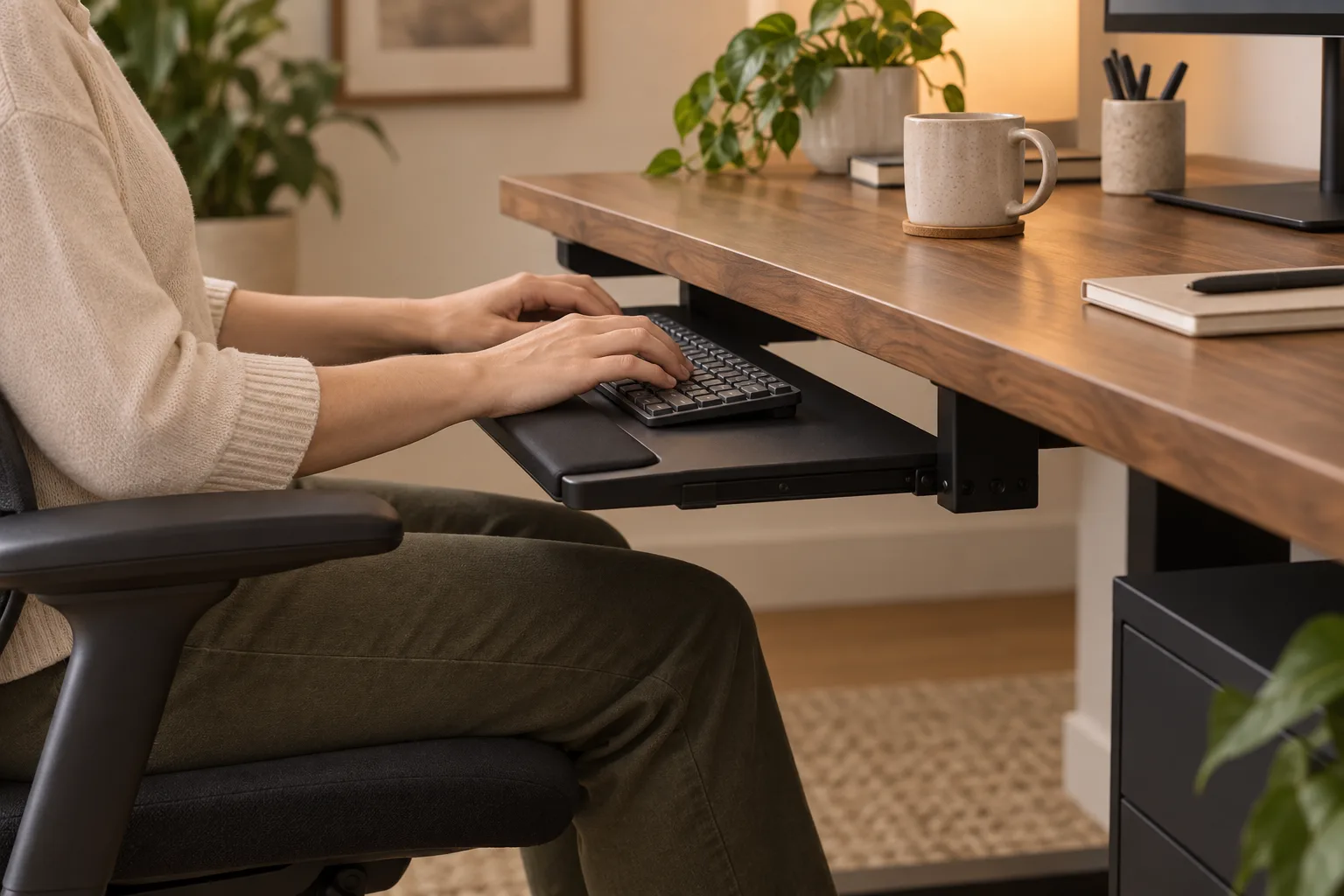
If you are looking for a desk setup for carpal tunnel, start by making the keyboard and mouse easy to reach while your hands, wrists and forearms stay roughly in one straight line. Adjust the chair, desk, keyboard and mouse together, then test one change at a time. An ergonomic setup is not a cure or a diagnosis; persistent or worsening symptoms need advice from a qualified health professional.
Carpal tunnel syndrome involves pressure on a nerve at the wrist, but hand symptoms can have other causes. This article covers general workstation fit only. It does not replace medical assessment or individualized treatment.
Start with the whole working position
Do not move only the keyboard while the chair and desk keep the arms raised or the shoulders reaching forward. Adjust seat height so the feet are supported, the shoulders can relax and the elbows remain close to the body. Then set the keyboard where you can type with your forearms roughly parallel to the floor and your wrists generally straight.
OSHA describes a neutral computer-workstation position as hands, wrists and forearms straight, in line and roughly parallel to the floor. The exact setup depends on your body and furniture, so treat that as a reference posture rather than a measurement that fits everyone. See the agency’s computer workstation positions guide.
Place the keyboard where your hands can stay relaxed
Keep the keyboard close enough that you do not reach for it, and avoid placing it so high that you bend your wrists upward. Use a neutral or slightly negative tilt if that feels more comfortable; do not copy a fixed angle from a product listing. If a keyboard tray helps you reach the desk’s input zone, check its full height range, width and knee clearance before installing it. Our keyboard tray installation guide covers mounting and clearance.
Keep both hands free to move while typing. A wrist rest is a resting surface, not a ledge to press into during every keystroke. If the keyboard feels cramped, try moving other objects first or compare a narrower keyboard only if it gives the mouse more room without forcing an unfamiliar posture.
Bring the mouse close to the keyboard
Place the mouse immediately beside the keyboard and on the same general working level. A mouse positioned far away can make you reach with the shoulder and bend the wrist to steer. OSHA’s mouse placement guidance recommends positioning the pointer so the wrist can remain straight and neutral, and keeping it close to the keyboard.
Try the mouse at the side you naturally use and check whether the forearm can remain near the torso. A trackball, compact mouse or keyboard shortcuts may reduce a reach for some people, but no pointing device is a universal fix. Choose by a short, low-pressure trial and stop if it makes symptoms worse.
Use wrist and palm supports carefully
A wrist rest can make the keyboard edge feel less sharp, but its height and position matter. OSHA notes that the hands should move freely and stay elevated above the rest while typing; when you pause, the support should contact the heel or palm rather than pressing directly on the wrist. Read the agency’s wrist and palm support guidance.
If the rest pushes your hands upward, makes the wrist bend or creates pressure at the front edge, remove it and reassess the desk height. A softer pad does not correct a keyboard placed too high or too far away.
Run a short workstation fit check
- Sit in your usual chair and set the feet on the floor or a stable footrest.
- Relax the shoulders and place the keyboard close enough that your elbows remain near your sides.
- Type for a few minutes while checking that the wrists are not held bent upward, downward or sideways.
- Move the mouse through your normal range without reaching past the keyboard.
- Notice pressure from desk edges, a wrist rest, a chair arm or a tray bracket.
- Change one item, then compare the same task again. Stop if the change causes pain or other symptoms.
Work posture varies through the day. OSHA also recommends changing positions periodically rather than staying still for a long stretch. Small position changes can be part of a workstation routine, but they are not a treatment plan for carpal tunnel syndrome.
Know when a desk adjustment is not enough
Carpal tunnel syndrome can involve tingling, numbness, pain or grip weakness, but those symptoms are not specific enough to diagnose from a desk photo or a posture checklist. The NHS advises seeking medical help when symptoms worsen or do not go away. Review its carpal tunnel syndrome overview or contact a clinician who can assess your situation.
If you have already received a diagnosis, follow the plan you made with your clinician. Keep notes about which work activities increase discomfort and which workstation changes feel better, then share that information at your next appointment. Do not delay care because a new keyboard or wrist rest seems promising.
Common workstation mistakes
- Buying a wrist rest before checking the keyboard height and reach.
- Putting the mouse far from the keyboard because other objects occupy the input area.
- Pressing the wrists into a support while typing.
- Changing several devices at once, so it is hard to tell which change mattered.
- Treating an ergonomic product as a cure or a substitute for medical advice.
Desk setup for carpal tunnel FAQ
What is a neutral wrist position at a desk?
A neutral wrist stays generally straight in line with the forearm rather than bent up, down or to the side. Adjust the chair, keyboard and mouse together to make that position easier.
Should I use a wrist rest while typing?
If you use one, OSHA advises that the palm or heel of the hand should contact the support while resting, with the hands lifted above it during typing. It should not press on the wrist or force a bent position.
Can an ergonomic desk setup cure carpal tunnel syndrome?
No. Desk adjustments are not a diagnosis or a cure. They can help you review workstation fit, but medical assessment and treatment decisions belong with a qualified health professional.
When should I get medical advice?
Seek clinical advice if symptoms are worsening, not going away, or interfering with your activities. Tingling, numbness, pain or weak grip should not be diagnosed from a desk setup alone.
Sources and next reads
- OSHA: neutral computer workstation positions
- OSHA: pointer and mouse placement
- OSHA: wrist and palm support
- NHS: symptoms and when to seek help
- How to set up a home office — review the desk, chair and screen together.
Check the keyboard height and mouse reach first. Seek medical advice for symptoms rather than relying on a desk accessory.