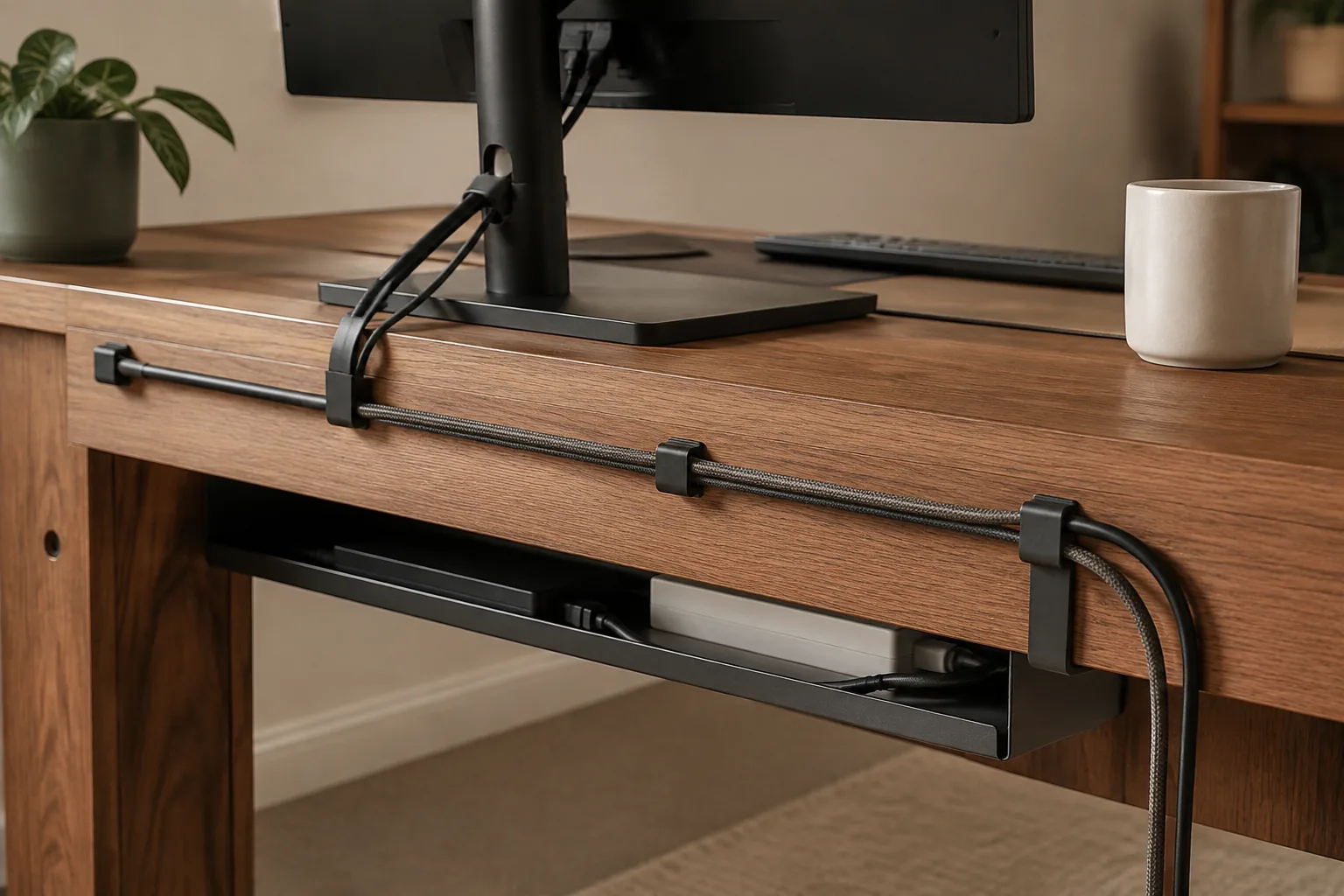
Good desk cable management doesn’t hide every wire. It gives power one clear route, keeps charging ends within reach, and lets you move one device without undoing the rest of the desk.
Quick answer
Start with the route, not the product.
For most desks, that means a tray under the desk for the fixed bundle and somewhere to put the power strip that you can still open. The two picks below cover those jobs. Further down are a five-minute cable reset to do before you buy anything, and the checks that stop an organizer from becoming the next problem.
Our starting point
Under-desk tray · clips · accessible power
Quick picks
- Best overall: telescopic clamp-on metal cable tray. It holds the power strip and fixed bundle under the desk without drilling.
- Best cable management box: power-strip cable management box, for hiding a strip on top of the desk or on the floor.
Price bands compare the two listings with each other. Check the current price and variant on the listing.
Desk cable management picks compared
| Pick | What it solves | Mount | Price band | Verify before ordering |
|---|---|---|---|---|
| Telescopic clamp-on metal cable tray | Power strip and fixed cables off the floor | Clamps to the desk edge, no drilling | Mid-range | Selected width, clamp fit on your edge, cable capacity |
| Power-strip cable management box | A visible strip and loose plugs | Freestanding | Budget | Interior size against your strip, openings, airflow |
Load limits, clamp ranges and exact dimensions aren’t confirmed for these listings, so the table doesn’t give any. Check them on the listing for the variant you select.
The two desk cable management products worth comparing
1. Telescopic clamp-on metal cable tray: best overall
The listing is a telescopic metal under-table rack, or tray, that clamps on without drilling. It suits the heaviest part of a desk setup: the power strip, the laptop brick and the cables that never move. Telescopic means the width adjusts, so a single tray can fit desks of different widths.
It’s the most flexible first move for a fixed desk. Once the bundle is off the floor, it’s easier to vacuum under the desk and easier to trace a single cable.
Good fit for: a fixed home-office desk with a power strip and several bricks, and renters who can’t drill.
What to check:
- The width range of the variant you select, against the usable length under your desk.
- Desk-edge clearance. A frame rail, drawer or modesty panel can sit right where the clamp needs to grip.
- That your strip and bricks fit inside the tray with room to bend the cables.
Telescopic clamp-on metal cable tray: mid-range in this shortlist. Check the current price and width variant.
2. Power-strip cable management box: best cable management box
The listing is a desktop storage box for a plug board, or power strip, and its loose leads. A box makes sense when the strip has to stay visible, on the floor or on a shelf, and you want it to look like one object rather than a nest of plugs.
Good fit for: desks without a tray, shared rooms where the strip sits in view, and keeping pets or kids away from the plugs.
What to check:
- Interior length, width and height against your actual strip with its plugs in.
- Openings for the cables in and out, and airflow. A box shouldn’t become a sealed heat trap.
- Whether the variant you select includes the top charging shelf or slot shown in the photos.
Power-strip cable management box: budget in this shortlist. Check the interior size and current price.
The five-minute cable reset before you buy anything
Before adding another organizer, give the desk a short reset. It shows which cables actually need a product and which only need a better route.
- Start with the cables you touch. The laptop charger, headphones, phone cable, monitor lead or a drive you move between rooms come first. Leave fixed connections alone for the first pass.
- Label each cable by destination. Note which ends move and which stay put, so you can see the routes that keep crossing the work surface.
- Choose one exit point. Use the back corner, a gap beside the monitor or an opening in the desk. When every cable takes a different route, the surface becomes a map you have to read every time you sit down.
- Keep the point of use reachable. Leave a small loop at the device and gather the excess near the exit point, so the cable doesn’t drag across the desk or disappear behind the monitor. Separate power cables from data cables where the route makes that practical.
- Move spares out of the route. A drawer or box suits spare leads and rarely used adapters, but it can hide the cable you need today, so keep daily cables out of storage. Our guide to organizing desk drawers covers where spares should go.
If a cable keeps falling back into the same messy position, treat that as information about the route, not as a reason to buy a larger box.
How to choose desk cable management
Map the route before choosing the organizer
Trace the laptop charger, monitor lead, speakers, headphones and phone cable from the point of use to the outlet or device. Mark which ends move and which stay fixed. Good desk cable management usually has one or two clear exit points rather than a separate route for every wire.
Match the format to the bundle
| Format | Best use | Verify first | Main compromise |
|---|---|---|---|
| Under-desk tray | Power strip, bricks and fixed bundles | Mounting clearance and tray capacity | Needs a suitable underside or desk edge |
| Desk-clamp power strip | Plugs you swap often | Plug, voltage, safety listing, clamp fit | Adds a cable that has to reach the wall |
| Cable management box | A visible strip and loose adapters | Interior size, openings and airflow | Can hide the connection you need |
| Adhesive clips | One or two charging leads at the edge | Surface, adhesive and cable size | Limited hold; not for a bundle |
| Sleeve | Several cords running the same way | Length and bundle diameter | Awkward where cables split |
Clips and sleeves are cheap finishing touches for the visible part of the route. A tray and a box handle the parts that actually create the mess: power and bulk. If you want outlets at the desk edge, our desk clamp power strip guide covers what a US-safe strip needs.
Measure the underside for under-desk cable management
Under-desk cable management fails most often because of the desk, not the product. Before ordering a tray, check:
- Usable length: the run between legs, drawers or the frame, not the full desk width.
- Clamp zone: a flat, solid edge with nothing directly below it where the clamp grips.
- Knee and chair clearance: a loaded tray hangs lower than an empty one. Sit down and check where your knees and chair arms go.
- Strip size: measure the strip with plugs in. Wide bricks are what overflow a tray.
Treat power as its own design problem
Check the strip itself before the organizer around it: plug type, voltage, number of AC outlets, cord length and stated load guidance. Plug the strip straight into the wall rather than into another strip, and keep the switch reachable. USB-A and USB-C ports are useful, but they don’t replace an AC outlet for a monitor or computer. Our desk clamp power strip guide covers the US safety label in more detail.
Design for movement on a standing desk
Measure the cable path with the desk at its lowest and highest positions. Leave enough slack for the full travel range, but keep the loop away from the frame, casters and floor. Mount the tray and strip on the desktop so they rise with it, and run a single cord from the strip to the wall along a leg. If the desk ever loses its height settings, see how to reset a standing desk.
Keep the ends identifiable
Hide the middle of a cable, not its destination. Leave the connector visible at the point of use, and label cables that look alike. This matters most when several USB-C leads, display cables or chargers share one tray.
Pick by setup
- One monitor, fixed home office: the clamp-on tray for the strip and bricks, plus a clip or two at the front edge for the phone lead.
- Small desk with one charging point: a single clip at the desk edge for the charging lead, and the strip in the box or tray. A UL or ETL listed desk-clamp strip can replace the floor strip if you’d rather plug in at the edge.
- Large power brick or several adapters: the tray if the bundle needs airflow and frequent access. The box if visual containment matters more.
- Sit-stand desk: tray and strip on the desktop, one slack loop to the wall, then test both height limits before you tie anything down.
- A desk that changes often: keep the tray, skip permanent adhesive, and leave one spare route for a laptop swap or a visitor’s charger.
Desk cable management mistakes worth avoiding
- Buying by appearance. A sleek box or tray can still be too small for the strip, charger and cable bends. Measure the real bundle first.
- Forgetting standing-desk travel. A route that looks fine while seated can pull tight at full height.
- Hiding a power strip you can’t reach. You still need the switch, and you’ll need to see the connection when troubleshooting.
- Overpacking a box. Leave room for cable bends, and keep heat-producing adapters from being buried.
- Ordering the wrong regional strip. A plug adapter doesn’t make an EU-plug, 250 V strip a US product.
Related desk setup guides
- Desk clamp power strip guide
- Desk organizers
- Under-desk drawers
- Monitor arms, if you’re routing a cable along an arm
FAQ: choosing the best cable management for desk setups
What is the best desk cable management?
Start with one clear exit point and match the organizer to the route. An under-desk tray handles the power strip and fixed bundle, and a box hides a strip that has to stay visible. Clips keep the cords you swap often within reach. The best system stays adjustable and keeps the cable ends visible.
What is the best cable organizer for a desk?
For a fixed desk, an under-desk tray is the most flexible starting point. It can hold a power strip, bricks and fixed cables without taking surface space. Add clips or a sleeve only for the visible part of the route.
How do I manage cables under my desk without drilling?
Use a clamp-on tray that grips the desk edge, and route the cables to it with clips. Check that the edge is flat and solid, and that nothing sits directly below where the clamp grips. Adhesive trays also avoid drilling, but they depend on the surface and the load.
Should a power strip go under the desk?
It can, when it’s mounted securely, remains reachable and has a clear route away from moving parts. Confirm the plug, voltage, load guidance and cord length, and don’t pack it into a hot or inaccessible space.
What is the best power strip for a standing desk?
One mounted on the desktop so it moves with your devices, with a cord that reaches the wall at the desk’s highest setting plus a slack loop. Confirm a US plug and voltage, test both height limits, and keep the switch easy to reach.
Are cable management boxes safe for power strips?
Only when the box is meant for that use and the strip, plugs and cable bends fit without crowding. Keep the openings clear, don’t exceed the strip’s load guidance, and don’t bury heat-producing adapters inside.
How do I hide cables without losing access?
Hide the long middle section and leave a short, labeled loop at the point of use. A tray under the desk keeps the route clean while the ends stay visible.
The practical starting point
Choose the route. Then check the listing.
Measure first, then compare the two picks above. Confirm the exact variant and the listed size or fit details before you order; prices and availability are set by the retailer and can change.
Return to the picks